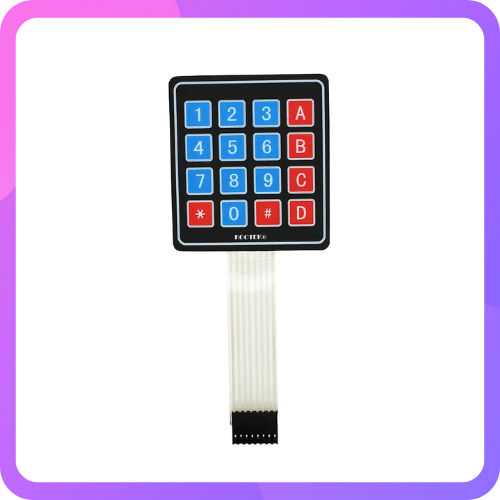

4×4 Matrix 16 Keyboard Keypad
4×4 Matrix 16 Keyboard Keypad
SKU:VT01105
Low stock: 3 left
Couldn't load pickup availability
4x4 Matrix Membrane Keypad -16 Keys
This DC 12V 4×4 Matrix Keypad Membrane Switch is high-quality soft touch feeling button keypad with 100 million life-stroke lifespans and good resistance to environmental conditions.
This DC 12V 4×4 Key Matrix Membrane Switch Keypad is a high-quality product at very low cost for your application needs.
This 16-button keypad provides a useful human interface component for microcontroller projects. Convenient adhesive backing provides a simple way to mount the keypad in a variety of applications.
The Keypad 4×4 features a total of 16 buttons in Matrix form. This is a membrane keypad with no moving parts. A female 8-pin berg connector is require for interfacing it with your microcontroller circuits.
Note: The product image may vary in terms of color
Technical Details
- Item Type: Keypad Module
- Model Type: Switch Keypad
- Operating Voltage (VDC): 35
- Operating Current (mA): 100
- Contact Resistance: 500Ω
- Insulation Resistance (MOhm): 100
- Dielectric Strength: 250VRms
- Length (mm): 165
- Width (mm): 70
- Height (mm): 1
- Weight (g): 7
Features
- Ultra-thin design & adhesive backing provides easy integration to any project
- Excellent price-performance ratio
- Easy communication with any microcontroller
- 5 pins 2.54mm pitch connector, 4x 4type 16 keys
- Sticker can peel off for adhesive mounting
- Used widely in industrial and home electronic equipments, instrument, etc.
- This allows a microcontroller to ‘scan’ the 8 output pins to see which of the 16 buttons is being pressed
Applications :
- Password-Protected Locks: Used for secure access systems.
- Home Automation: Control devices via keypad inputs.
- Menu Navigation: Navigate options in embedded systems.
- Data Entry: Input numerical or custom data in microcontroller projects.
- Industrial Controls: Provide simple input for machines and equipment.
- Gaming Consoles: Customizable inputs for gaming interfaces.
- Alarm Systems: Arming/disarming security alarms.
- Robotics: Command robot operations manually.
- DIY Projects: Flexible interface for hobbyist applications.
- Vending Machines: Key-based selection for products.
Integration with Arduino of 4 by 4 keypad

Sample Code
| #include <Wire.h> |
| #include <LiquidCrystal_I2C.h> |
| #include <Keypad.h> |
| const byte ROWS = 4; |
| const byte COLS = 4; |
| char hexaKeys[ROWS][COLS] = { |
| {'1', '2', '3', 'A'}, |
| {'4', '5', '6', 'B'}, |
| {'7', '8', '9', 'C'}, |
| {'*', '0', '#', 'D'} |
| }; |
| byte rowPins[ROWS] = {9, 8, 7, 6}; |
| byte colPins[COLS] = {5, 4, 3, 2}; |
| Keypad customKeypad = Keypad(makeKeymap(hexaKeys), rowPins, colPins, ROWS, COLS); |
| LiquidCrystal_I2C lcd(0x27, 16, 2); |
| void setup(){ //https://kitsguru.myshopify.com/products/4x4-matrix-keypad-membrane-switch-arduino-arm-mcu |
| lcd.backlight(); |
| lcd.init(); |
| } |
| void loop(){ |
| char customKey = customKeypad.getKey(); |
| if (customKey){ |
| lcd.clear(); |
| lcd.setCursor(0, 0); |
| lcd.print(customKey); |
| } |
| } |
| //Credits : https://osoyoo.com/2017/09/13/arduino-lesson-4x4-matrix-keypad/ |
Integration with Raspberry Pi

Sample Code
| import RPi.GPIO as GPIO |
| import time |
| # These are the GPIO pin numbers where the |
| # lines of the keypad matrix are connected |
| L1 = 5 |
| L2 = 6 |
| L3 = 13 |
| L4 = 19 |
| # These are the four columns |
| C1 = 12 |
| C2 = 16 |
| C3 = 20 |
| C4 = 21 |
| # The GPIO pin of the column of the key that is currently |
| # being held down or -1 if no key is pressed |
| keypadPressed = -1 |
| secretCode = "4789" |
| input = "" |
| # Setup GPIO |
| GPIO.setwarnings(False) |
| GPIO.setmode(GPIO.BCM) |
| GPIO.setup(L1, GPIO.OUT) |
| GPIO.setup(L2, GPIO.OUT) |
| GPIO.setup(L3, GPIO.OUT) |
| GPIO.setup(L4, GPIO.OUT) |
| # Use the internal pull-down resistors |
| GPIO.setup(C1, GPIO.IN, pull_up_down=GPIO.PUD_DOWN) |
| GPIO.setup(C2, GPIO.IN, pull_up_down=GPIO.PUD_DOWN) |
| GPIO.setup(C3, GPIO.IN, pull_up_down=GPIO.PUD_DOWN) |
| GPIO.setup(C4, GPIO.IN, pull_up_down=GPIO.PUD_DOWN) |
| # This callback registers the key that was pressed |
| # if no other key is currently pressed |
| def keypadCallback(channel): |
| global keypadPressed |
| if keypadPressed == -1: |
| keypadPressed = channel |
| # Detect the rising edges on the column lines of the |
| # keypad. This way, we can detect if the user presses |
| # a button when we send a pulse. |
| GPIO.add_event_detect(C1, GPIO.RISING, callback=keypadCallback) |
| GPIO.add_event_detect(C2, GPIO.RISING, callback=keypadCallback) |
| GPIO.add_event_detect(C3, GPIO.RISING, callback=keypadCallback) |
| GPIO.add_event_detect(C4, GPIO.RISING, callback=keypadCallback) |
| # Sets all lines to a specific state. This is a helper |
| # for detecting when the user releases a button |
| def setAllLines(state): |
| GPIO.output(L1, state) |
| GPIO.output(L2, state) |
| GPIO.output(L3, state) |
| GPIO.output(L4, state) |
| def checkSpecialKeys(): |
| global input |
| pressed = False |
| GPIO.output(L3, GPIO.HIGH) |
| if (GPIO.input(C4) == 1): |
| print("Input reset!"); |
| pressed = True |
| GPIO.output(L3, GPIO.LOW) |
| GPIO.output(L1, GPIO.HIGH) |
| if (not pressed and GPIO.input(C4) == 1): |
| if input == secretCode: |
| print("Code correct!") |
| # TODO: Unlock a door, turn a light on, etc. |
| else: |
| print("Incorrect code!") |
| # TODO: Sound an alarm, send an email, etc. |
| pressed = True |
| GPIO.output(L3, GPIO.LOW) |
| if pressed: |
| input = "" |
| return pressed |
| # reads the columns and appends the value, that corresponds |
| # to the button, to a variable |
| def readLine(line, characters): |
| global input |
| # We have to send a pulse on each line to |
| # detect button presses |
| GPIO.output(line, GPIO.HIGH) |
| if(GPIO.input(C1) == 1): |
| input = input + characters[0] |
| if(GPIO.input(C2) == 1): |
| input = input + characters[1] |
| if(GPIO.input(C3) == 1): |
| input = input + characters[2] |
| if(GPIO.input(C4) == 1): |
| input = input + characters[3] |
| GPIO.output(line, GPIO.LOW) |
| try: |
| while True: |
| # If a button was previously pressed, |
| # check, whether the user has released it yet |
| if keypadPressed != -1: |
| setAllLines(GPIO.HIGH) |
| if GPIO.input(keypadPressed) == 0: |
| keypadPressed = -1 |
| else: |
| time.sleep(0.1) |
| # Otherwise, just read the input |
| else: |
| if not checkSpecialKeys(): |
| readLine(L1, ["1","2","3","A"]) |
| readLine(L2, ["4","5","6","B"]) |
| readLine(L3, ["7","8","9","C"]) |
| readLine(L4, ["*","0","#","D"]) |
| time.sleep(0.1) |
| else: |
| time.sleep(0.1) |
| except KeyboardInterrupt: |
| print("\nApplication stopped!") |
Physical Attributes of 4 by 4 keypad
- Length (mm): 165
- Width (mm): 70
- Height (mm): 1
- Weight (g): 7
Package Includes
- 1 x 4x4 Matrix Membrane Keypad -16 Keys